Pending Programs
Programs display to local areas first. Following local area review, they then display to the state administrator. Local areas can view, but not modify, pending, approved, and denied self-service user accounts from the Approval Menu. The accounts are managed by the state administrator.
The Performance page displays after the Program page during the approval process. If Performance is required, you cannot proceed without adding performance. If Performance is not required, you can proceed without filling out any of the fields on the Performance page. Whether or not performance data is required is a setting in AJL. Each state can determine the setting.
Approve or Deny Pending Program
- From the left-hand navigation menu, click Approval Menu, then click Pending Initial Programs. The State Pending Initial Programs page displays.
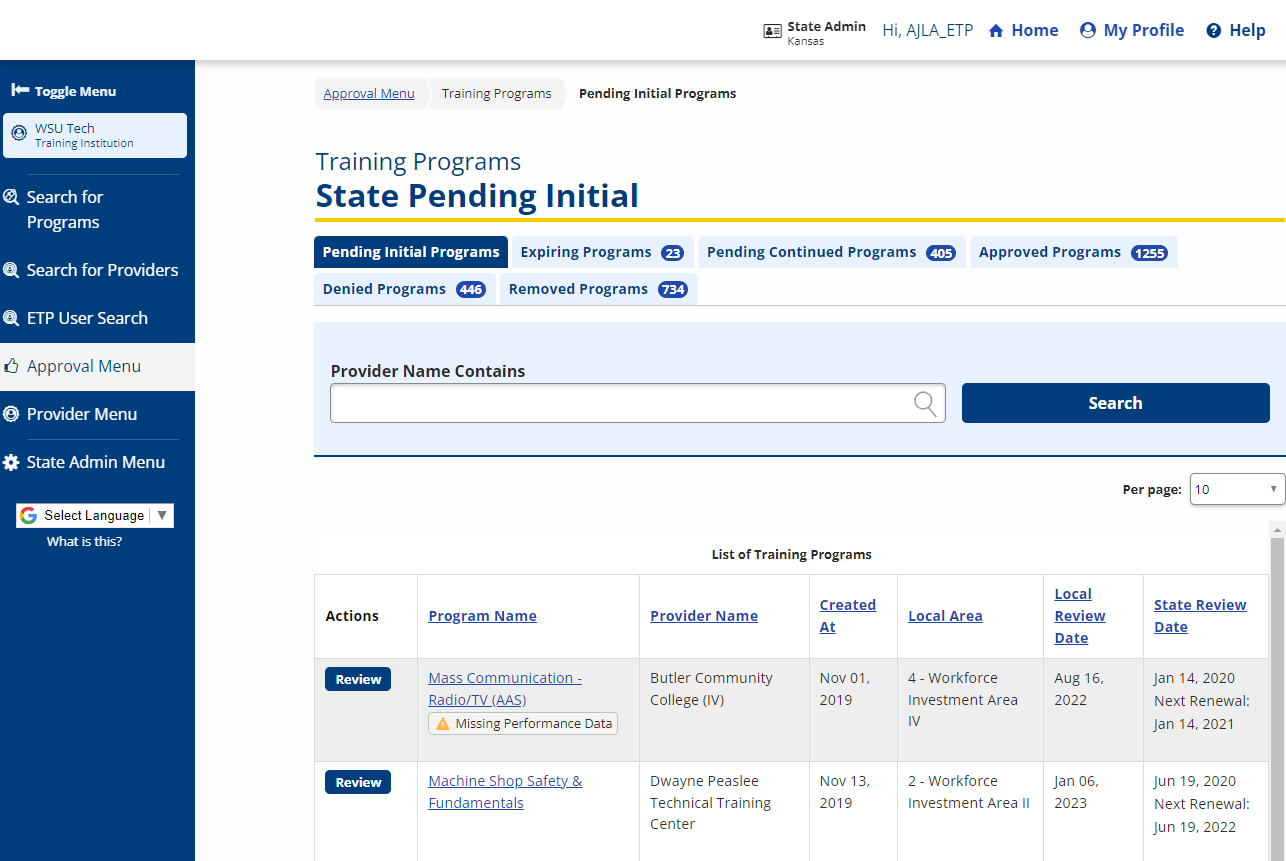
- Click Review for the program you want to view. The Program Description page displays. Review the information and click Save.
- The Program Performance page displays.
- Performance may not be required for initial eligibility.
- Performance may not be required for subsequent eligibility depending on state policy and procedure.
- If the state has a waiver for performance for subsequent eligibility, set the application variables so that performance is not required.
- Review the information on the Program Performance page and click Finish. The Local Area/State Status Review page displays.
- To approve, deny, or remove the program, select the appropriate status under State Approval Status.
- Be very careful not to skip this field. If the default Non-WIOA is saved, the entire approval process is negated and begins again from scratch.
- Enter comments and notes in the State Approval Comments box. AJLA–TS recommends adding comments for every status update.
- If the local area coordinator approves a program that does not meet state performance requirements, AJLA–TS recommends that the state administrator require comments (stating the reason for the approval) from the local area coordinator.
- If the local area coordinator denies a program that does meet state performance requirements, AJLA–TS recommends that the state administrator require comments (stating the reason for the denial) from the local area coordinator..
- The ETP List is a statewide list. Although local areas have the responsibility to determine training policies, programs should not be denied if they do not meet the local area policy but otherwise meet all eligibility requirements. Local areas are not required to use programs on the statewide ETP List if the program does not meet local area training policy..
- To approve, deny, or remove the program, select the appropriate status under State Approval Status.
- Enter the Name of the State ETP Official. This is the name of the person who is updating the status.
- Enter the Title of the State ETP Official. This is the title of the person who is updating the status.
- Enter the Status Change Date in the mm/dd/yyyy format.
- The program now displays in the Approved Initial Programs queue if approved, and displays to the public as WIOA-Approved.
Pending Denied and Removed Programs
If the local area denies or removes a program, the state administrator must also deny or remove the program. The Denied and Removed queues display asterisks to indicate action is required of the state administrator. Programs removed or denied by the local area coordinator will continue to display to the public and in ServiceLink to casetrackers as WIOA-approved until the state administrator reviews and denies/removes the program.
Monitoring for Local Area Denials And Removals
The following instructions are for denials. Removals and denials use the same navigation.
- From the left-hand navigation menu, click Approval Menu, then click Denied Programs. The Denied Programs page displays.
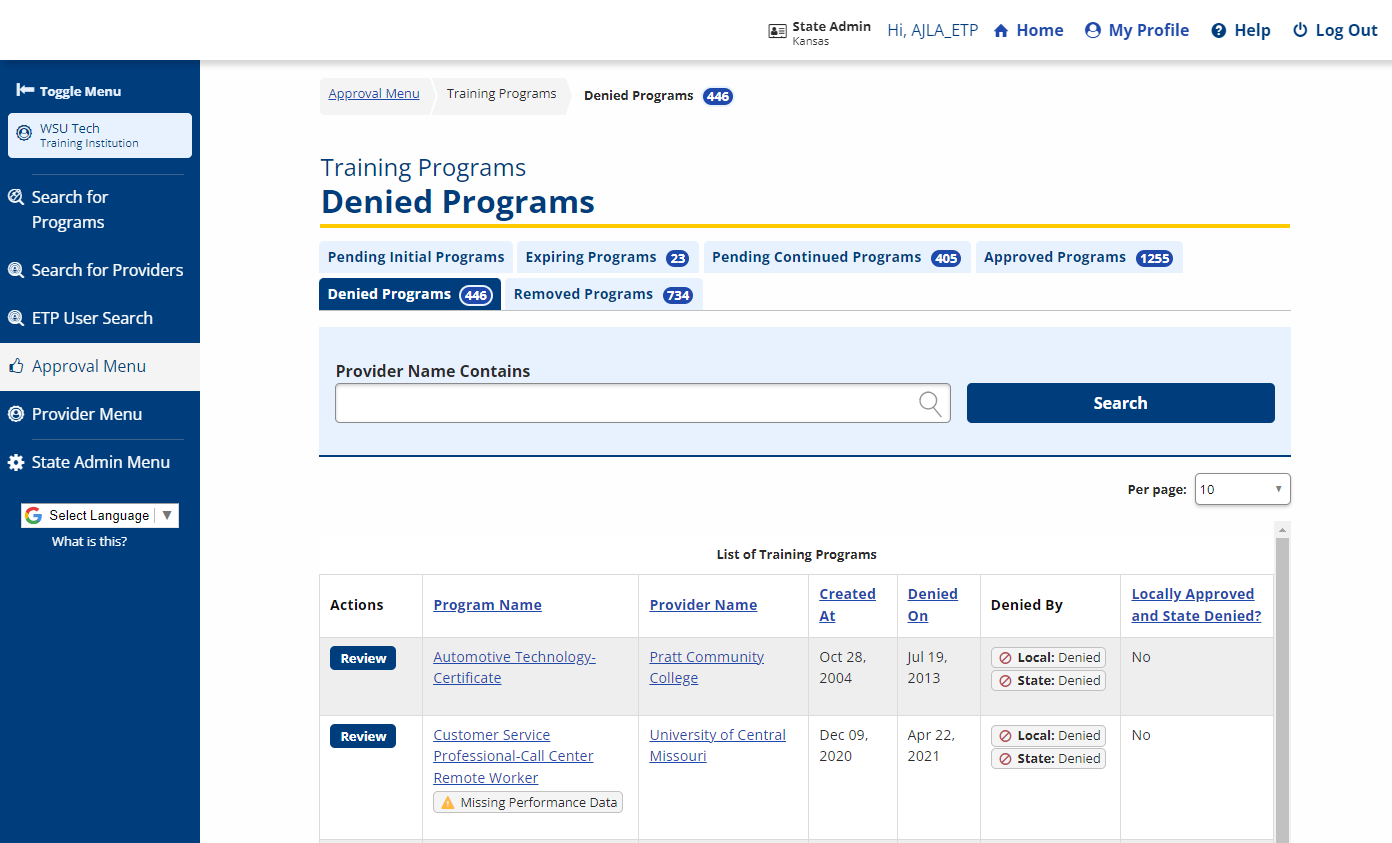
Columns are:- Program Name
- Provider Name: If the provider name is a link, the provider is denied. If provider name is not a link, only the program is denied, not the provider.
- Created At: Date the program was created.
- Denied On: Date the program was denied.
- Denied By: Local and/or State.
- Locally Approved and State Denied?: If the program was approved by a local administrator but denied by a state administrator, "Yes" is displayed in this column. If the program was denied at both levels, "No" is displayed.
- The default sort for the page is the By column. Programs denied by the local area but not denied by the state administrator display at the top of the list.
- Programs denied by the Local Area must also be denied by the state administrator.
- For each program with "Local: Denied" in the Denied By column, click the link in the Program column, review the program, and update the status as appropriate.