Statistical Model Coefficients Maintenance
Administrators can view and edit the statistical model coefficients, which are used to calculate the claimant profiling scores. A profiling score is calculated as the sum of each of these values.
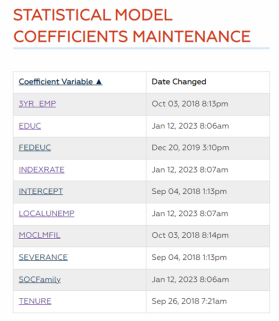
Navigation
-
From the left-hand navigation menu, click Admin Tasks.
-
Click the ReEmployLink tab.
-
Click the Statistical Model Coefficients Maintenance tile.
View/Edit Statistical Model Coefficient Maintenance
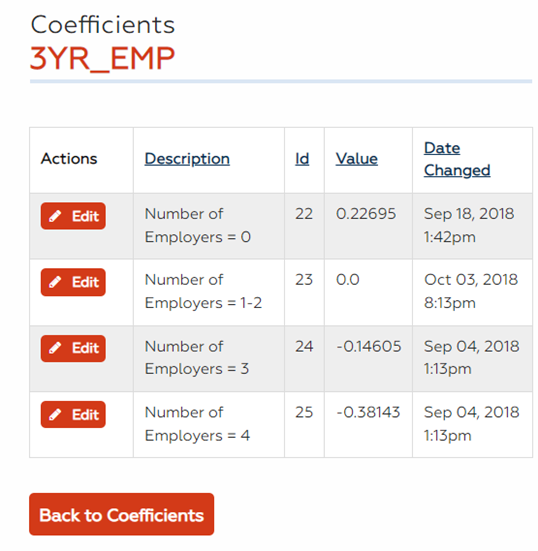
- To edit a variable, click Edit next to the Coefficient Variable. The View Model Coefficient Variables page displays. The following is a brief explanation of the variables. The values of these variables have been assigned by a statistician and do not reflect the actual attributes of a claimant.
3YR_EMP: Number of employers a job seeker has had in past 3 years.
 Values
Number of Employers = 1
Number of Employers >1 and <= 2
Number of Employers >2 and <= 3
Number of Employers >3 and <= 4
Number of Employers >4 and <= 8
Number of Employers >8 and <=12
Number of Employers >12 and <=20
Number of Employers >20
Number of Employers Otherwise
CLAIMDURATION: Number of weeks the job seeker has been receiving UI payments.
Values1-3 weeks
4-7 weeks
8+ weeks
EDUC: job seeker's education level.
ValuesEducation Default value if no match
Education H – high school
Education A – associate’s degree
Education B – bachelor’s degree
Education M – master’s degree
Education D – doctorate
Education O – other
FEDEUC: Used when a federal program is in effect. Not currently used (set to 0).
INDEXRATE: Industry Exhaust Rate; the first two digits of the NAICS codes are used to categorize. Defined by the job seeker's previous job and the likelihood that they could be reemployed in same field.
Values11
21
22
23
31-33
42
44-45
48-49
51
52
53
54
55
56
61
62
71
72
81
92
INTERCEPT: This is a constant value added in case all other values equal 0.
LOCALUNEMP: The non-seasonally adjusted total unemployment rate for each count. Based on the county of residence, the FIPS, and the month filed.
ValuesLocal Unemployment default if no value
Less or equal to 4.4%
Greater than 4.4% and less or equal to 5.8%
Greater than 5.8% and less or equal to 6.8%
Greater than 6.8% and less or equal to 13.4%
Greater than 13.4% and less or equal to 15%
Greater than 15%
MOCLMFIL: Month the claimant filed for unemployment. There is an assigned value for June, July, October, November, and December. All other months are assigned a 0 value.
ValuesFiling benefit month January
Filing benefit month February
Filing benefit month March
Filing benefit month April
Filing benefit month May
Filing benefit month June
Filing benefit month July
Filing benefit month August
Filing benefit month September
Filing benefit month October
Filing benefit month November
Filing benefit month December
SEVERANCE: Indicates if the job seeker was terminated. No severance will display as a binary of zero.
Values1 = yes
0 = no
SOCFamily: Standard Occupational Classification, defined by the job seeker's previous job.
ValuesManagement
Business and Financial Operations
Computer and Mathematical
Architecture and Engineering
Life, Physical, and Social Science
Community and Social Service
Legal
Educational Instruction and Library
Arts, Design, Entertainment, Sports, and Media
Healthcare Practitioners and Technical
Healthcare Support
Protective Service
Food Preparation and Serving Related
Building and Grounds Cleaning and Maintenance
Personal Care and Service
Sales and Related
Office and Administrative Support
Farming, Fishing, and Forestry
Construction and Extraction
Installation, Maintenance, and Repair
Production
Transportation and Material Moving
Military Specific
Unknown
TENURE: Number of years with previous employer.
ValuesTenure = 0
Tenure = 1
Tenure >= 2 and <=4
Tenure >= 5 and <=20
Tenure > 20
WBA: Indicates if the job seeker is receiving either the maximum weekly benefit amount or a lesser amount.
ValuesLess than maximum WBA
Equal Maximum WBA
- Click Edit next to the defined Coefficient Variable. The Edit Model Coefficient Variables page displays.
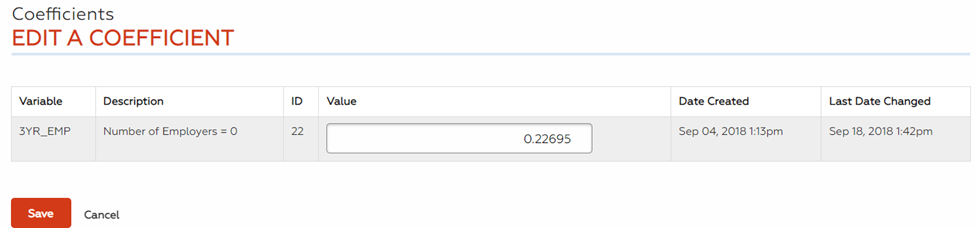
- All variable fields are pre-filled with the existing data. Edit the Value.
-
Click Save. The coefficient variable value is updated. You may also click Cancel to discard your changes and return to the Statistical Model Coefficients Maintenance page.