Update Claimant's Facility Code
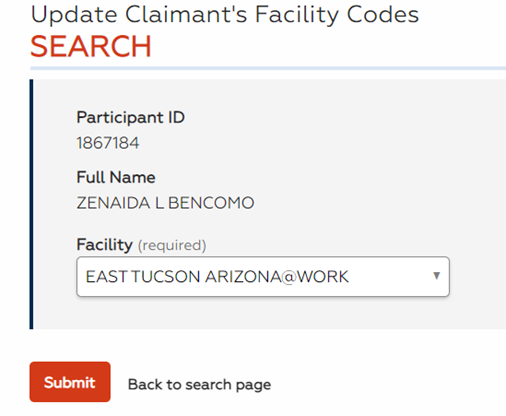
Administrators can enter and edit claimant facility codes for the claimant pool. The facility code on the Claimant Record is initially entered via the interface from UI and stored in the UI Claimant Pool Table. When the facility code is missing for a claimant, AJC will enter a default code for that job seeker. Staff can use this functionality to change the facility code to an actual office. This functionality can also be used when a claimant needs to change orientation offices.
Navigation
-
From the left-hand navigation menu, click Admin Tasks.
-
Click the ReEmployLink tab.
-
Click the Update Claimant's Facility Code tile.
View/Edit Claimant's Facility Code
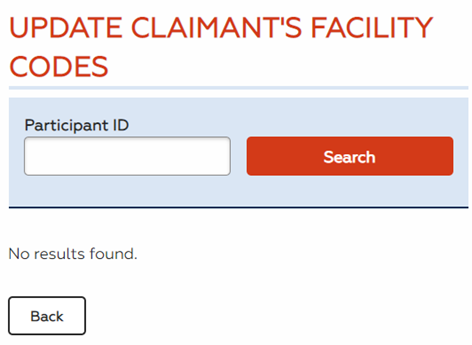
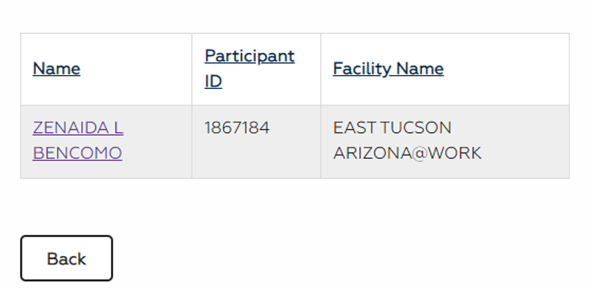
- Enter the claimant's Participant ID and click Search (partial searches are accepted). The search results display in a sortable list.
- Click the job seeker's name. The Edit Claimant Facility Code page displays.
- Select the new orientation facility from the drop-down and click Submit. The orientation facility is updated. You may also click Back to search page to discard your changes and return to the Update Claimant's Facility Codes page.